


When chatting with your CRM isn’t enough
Connecting Claude directly to GoHighLevel and asking it questions in plain English (covered in our companion guide) solves the “I never log into my CRM” problem. But it’s built for one request at a time — ask something, get an answer or an action, move on.
Some things aren’t a single request. They’re a repeatable process: “Every Monday, find every lead with no activity in 14 days and draft a re-engagement text for each one.” “Pull a report of every closed deal this quarter and calculate total commission.” “Clean up every duplicate contact record in my database.”
That’s a different tool: Claude Code connected to GoHighLevel’s API.
What’s actually different here
Claude (chat) reads and acts on your CRM in the moment, through a conversation. Claude Code is a coding tool — it can write, save, and re-run actual scripts. Connect it to GoHighLevel, and instead of asking a one-off question, you can build something that runs the same way every time, on your own schedule, doing something more complex than a single chat message would reasonably cover.
This is more technical than the chat-based connection. If you’re comfortable with a little setup, it takes about ten minutes. If that’s not you, this is exactly the kind of thing worth a Custom Setup conversation instead.
What you’ll need first
- The Claude desktop app, downloaded and installed.
- A paid Claude subscription — Claude Code requires at least the Pro plan ($20/month); it isn’t available on the free plan.
- Your GoHighLevel sub-account (location) ID and an API key for that sub-account — both available in your GoHighLevel account settings.
This guide covers connecting to a single sub-account/location. If you’re an agency wanting access across multiple locations, you’d set up credentials the same way for each one, or use full agency-level access — that’s beyond what this specific guide covers.
You do not need to register an MCP server for this approach — that’s the chat-based method covered in our other guide. This one works differently: Claude Code writes and runs actual code that calls GoHighLevel’s API directly, using credentials stored locally in your own project folder.
How to connect it — step by step
.env file with two placeholder entries:
Create a.envfile in this project with two placeholder variables:GHL_LOCATION_IDandGHL_API_KEY. Don't fill in real values yet — just set up the file structure. Also make sure.envis added to.gitignoreso these credentials never get committed to version control.
.env file in a text editor (Notepad, or any code editor) and replace the placeholder text after each = sign with your actual sub-account ID and API key, then save.
This matters more than it might seem. If you type or paste an API key directly into a chat with Claude Code, that value gets stored in your conversation history — which is exactly why Claude Code itself will often recommend regenerating a key the moment you paste one into the chat. It's not being overly cautious; a key that's sat in a conversation transcript is treated as potentially exposed, the same way you'd treat a password you'd emailed to someone. Typing it directly into the file, and never into the chat, keeps it out of that conversation history entirely.
The .env file has real values now. Can you verify we have access to the GoHighLevel sub-account by making a simple test request — like pulling the account or location details?
It'll confirm the connection is actually working before you build anything on top of it.From there, you can describe what you want built in plain English, and Claude Code writes the actual script.
What this actually unlocks
A few examples of the kind of thing worth building this way, rather than asking one-off in chat — with the actual prompt you’d use for each:
A recurring re-engagement script
Write a script that checks my GoHighLevel contacts for anyone with no activity in the last 14 days, and drafts a re-engagement text for each one. Don’t send them automatically — save the drafts somewhere I can review before sending.
Custom reporting
Pull every closed deal from this quarter and calculate total commission across them, broken out by month.
Bulk data cleanup
Find duplicate contact records in my GoHighLevel account, matching on name and phone number, and show me a list before merging anything.
Direct media uploads for social posts
Upload this image file and create a scheduled social media post using it, set to go out on [date] with this caption: [caption].
This last one is a real thing the chat-based MCP connection can’t do — it can schedule and link existing media, but not upload something brand-new directly.
A real warning about permissions
When you generate your GoHighLevel API key, you’ll choose which permissions to grant it. It’s worth actually thinking about this instead of just checking every box.
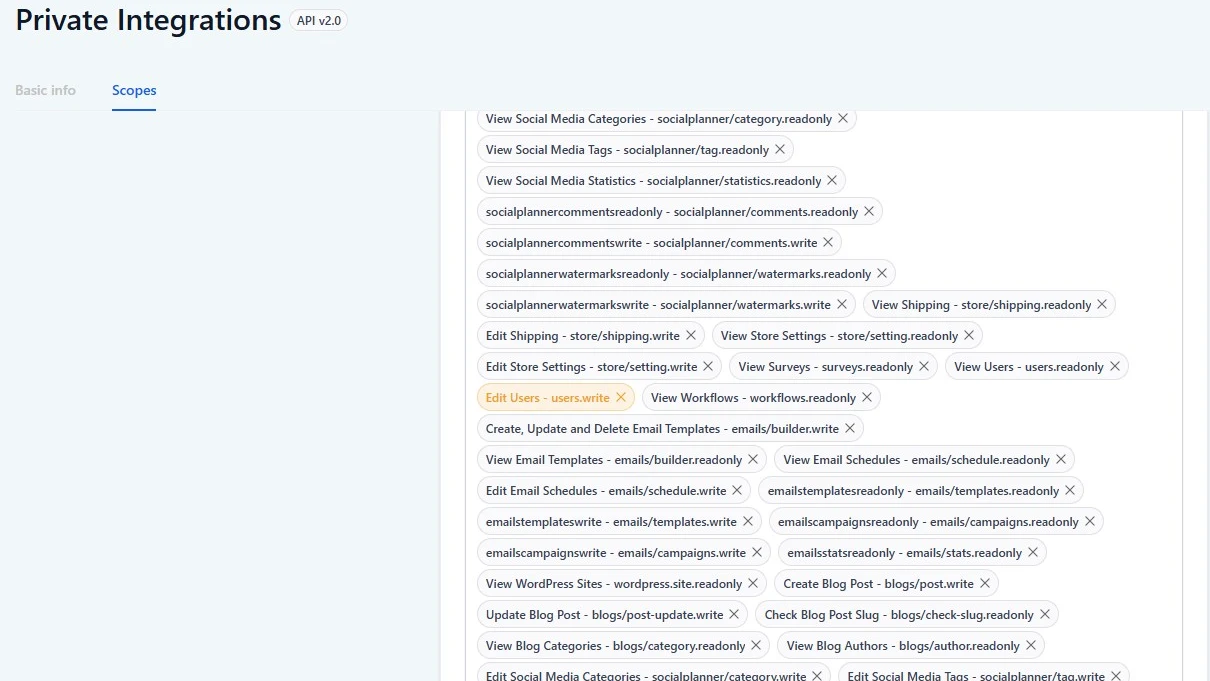
Full access means full access — create, read, update, and delete, across everything in that sub-account. That’s a lot of power to hand to an automated process, and it’s worth scoping down to only what you actually need for what you’re building.
One permission specifically worth a second look: GoHighLevel highlights “Edit Users” as a sensitive scope. Our recommendation is to leave that unchecked unless the actual purpose of what you’re building is to manage user accounts — that’s the kind of thing that should generally stay a human, internal decision, not something automated.
And the obvious but important part: keep this API key secure. Anyone who has it has the same level of access you granted it — full ability to create, update, or delete data in your GoHighLevel account. Treat it like a password, not a piece of code you paste into a public repo or share over an unsecured channel.
Who this is actually for
If you’re a solo agent who just wants to stop logging into your CRM, the chat-based Claude connection covers that completely — you don’t need this. This is for agents, teams, and brokerages who’ve outgrown what a single conversation can handle and want something running in the background, repeatedly, without you asking for it each time.
One real advantage worth knowing if you’re a team specifically
The chat-based MCP connection currently only supports one connected Claude account per GoHighLevel sub-account at a time — a real limitation we cover in our MCP guide.
The API approach here doesn’t have that problem. Since it’s built on API keys rather than a shared login flow, you can issue a separate key per team member, controlling exactly who has access and to what, without anyone getting locked out of the login screen by someone else’s existing connection.
If that’s you but the setup above feels like more than you want to handle yourself, that’s exactly what our Custom Setup tier exists for — we can build the automation logic around your specific process, using the same underlying connection described here.
Ready to build this?
Don’t have GoHighLevel yet? Start your free 30-day trial — most trials only give you 14 days.
Want custom automation built around your exact process instead of setting this up yourself?
Just want to talk to your CRM in plain English without any of this setup? Start with connecting Claude directly via MCP instead — no coding, a few minutes to set up.
FAQ
Open Claude Code in the Claude desktop app (requires a Pro subscription or higher), start a new session, select a project folder, and have Claude Code create a .env file with placeholder entries for your GoHighLevel sub-account ID and API key. Fill in the real values yourself, directly in the file — never paste them into the chat.
No — you describe what you want in plain English, and Claude Code writes the actual script. You do need to be comfortable with basic setup steps (creating a project folder, working with a .env file), which is the main difference from the chat-based MCP connection.
The chat-based MCP connection is for one-off requests in conversation — ask something, get it done. Claude Code via API is for building repeatable, scheduled, or more complex automations that run the same way every time without you asking again.
Yes — unlike the chat-based MCP connection, which currently supports one connected user per sub-account at a time, API keys can be issued individually per person, with permissions scoped to what each person actually needs.
Yes — Claude Code requires at least the Pro plan ($20/month). It isn't included on Claude's free plan.
Many agents comfortable with basic computer setup can do this in about ten minutes. If that's not you, or if you want custom automation logic built specifically around your workflow, that's exactly what our Custom Setup tier covers.